| revenue | |
|---|---|
| 2020-01-01 | 0.621284 |
| 2020-01-02 | 0.663410 |
| 2020-01-03 | 0.740837 |
| 2020-01-04 | 0.023144 |
| 2020-01-05 | 0.319831 |
Basics of Prophetverse API
Prophetverse is a powerful tool for building customized and glass-box forecasting and mix models. In Prophetverse, we define each component of the model as a separate effect, making this library extremely flexible to attend your specific needs.
In this page, we will:
- Understand the structure of
y(the target) andX(media & control variables) using the sktime interface.
- Understand the hyperparameters of Prophetverse
- Fit your first Bayesian MMM and generate forecasts.
1. Data Structures (y and X)
Prophetverse uses the sktime forecasting API. The essentials:
y: a pandas DataFrame indexed by a time index (pd.DatetimeIndexorpd.PeriodIndex). Single column for univariate MMM (e.g.revenue):
For panel datasets (e.g. in the case of multiple products or regions), use a MultiIndex, where the first index level is the entity (e.g. product or region) and the second level is the time.
| revenue | ||
|---|---|---|
| product | ||
| product_a | 2020-01-01 | 0.455520 |
| 2020-01-02 | 0.791347 | |
| 2020-01-03 | 0.896963 | |
| 2020-01-04 | 0.603326 | |
| 2020-01-05 | 0.878282 | |
| ... | ... | ... |
| product_c | 2020-12-27 | 0.213898 |
| 2020-12-28 | 0.704344 | |
| 2020-12-29 | 0.557674 | |
| 2020-12-30 | 0.663991 | |
| 2020-12-31 | 0.023322 |
1098 rows × 1 columns
X: a pandas DataFrame aligned on the same index containing exogenous variables (media spend, price, promotions, macro, etc.). Columns are arbitrary names.
The index type should always be the same for y and X, and every dataframe you use. After choosing Datetime or Period index for y, use the same type for X.
Example of dataset
Here we load a synthetic dataset:
from prophetverse.datasets._mmm.dataset1 import get_dataset

(y, X, *_) = get_dataset()


y.head()
/opt/hostedtoolcache/Python/3.11.15/x64/lib/python3.11/site-packages/tqdm/auto.py:21: TqdmWarning: IProgress not found. Please update jupyter and ipywidgets. See https://ipywidgets.readthedocs.io/en/stable/user_install.html
from .autonotebook import tqdm as notebook_tqdm2000-01-01 10815512.0
2000-01-02 11120677.0
2000-01-03 11260387.0
2000-01-04 11322533.0
2000-01-05 11321180.0
Freq: D, dtype: float32The X looks like this:
X.head()| ad_spend_search | ad_spend_social_media | |
|---|---|---|
| 2000-01-01 | 89076.191178 | 98587.488958 |
| 2000-01-02 | 88891.993106 | 99066.321168 |
| 2000-01-03 | 89784.955064 | 97334.106903 |
| 2000-01-04 | 89931.220681 | 101747.300585 |
| 2000-01-05 | 89184.319596 | 93825.221809 |
We will split the dataset into training and testing sets.
from sktime.split import temporal_train_test_split

y_train, y_test, X_train, X_test = temporal_train_test_split(y, X, test_size=0.2)
2. Prophetverse model
Think of Prophetverse as the conerstone of you MMM model. It is a flexible class that allows you to define the trend, seasonality, and custom exogenous effects of your model.
Simple Prophetverse model
We can use a simple Prophetverse model with Linear effects and a seasonality component:
from prophetverse import Prophetverse, LinearEffect, LinearFourierSeasonality

from prophetverse.utils.regex import starts_with, no_input_columns


seasonality_effect = LinearFourierSeasonality(
    sp_list=[365.25, 7],
    fourier_terms_list=[10, 3],
    prior_scale=0.1,
    freq="D",
    effect_mode="additive",
)

ad_spend_effect = LinearEffect()

model = Prophetverse(
    exogenous_effects=[
        ("ad_spend", ad_spend_effect, starts_with("ad")),
        ("seasonality", seasonality_effect, no_input_columns),
    ],
)

model.fit(y=y_train, X=X_train)
Prophetverse(exogenous_effects=[('ad_spend', LinearEffect(), '^(?:ad)'),
('seasonality',
LinearFourierSeasonality(fourier_terms_list=[10, 3], freq='D', prior_scale=0.1,
sp_list=[365.25, 7]),
'^$')])Please rerun this cell to show the HTML repr or trust the notebook.Prophetverse(exogenous_effects=[('ad_spend', LinearEffect(), '^(?:ad)'),
('seasonality',
LinearFourierSeasonality(fourier_terms_list=[10,
3],
freq='D',
prior_scale=0.1,
sp_list=[365.25, 7]),
'^$')])PiecewiseLinearTrend()
LinearEffect()
LinearFourierSeasonality(fourier_terms_list=[10, 3], freq='D', prior_scale=0.1,
sp_list=[365.25, 7])MCMCInferenceEngine()
By default, the model will run a MCMC inference to obtain the parameters. We can, however, easily switch to a MAP inference by setting inference_engine=MAPInferenceEngine() in the model constructor. The MAP inference is generally faster but provides point estimates of the parameters.
To run in-sample and out-of-sample forecasts of total revenue, we can simply call predict. We need to pass a “forecasting horizon” (fh) object, that should preferably be an index of the type of our y and X’s index. Since we want to forecast for both train and test timepoints, we use y.index as fh, and pass the full X as exogenous variables.
fh = y.index

y_pred = model.predict(fh=fh, X=X)

y_pred
2000-01-01 14483135.0
2000-01-02 14349836.0
2000-01-03 14425627.0
2000-01-04 14234283.0
2000-01-05 14376420.0
...
2004-12-28 32365186.0
2004-12-29 32117904.0
2004-12-30 32005488.0
2004-12-31 32258096.0
2005-01-01 32360852.0
Freq: D, Length: 1828, dtype: float32import matplotlib.pyplot as plt
def plot_forecasts(y_pred):
fig, ax = plt.subplots(figsize=(10,5))
ax.plot(y.index.to_timestamp(), y)
ax.plot(y_pred.index, y_pred)
ax.axvline(y_train.index.max().to_timestamp(), color="black", linestyle="--", label="Train/Test split")
fig.show()
plot_forecasts(y_pred)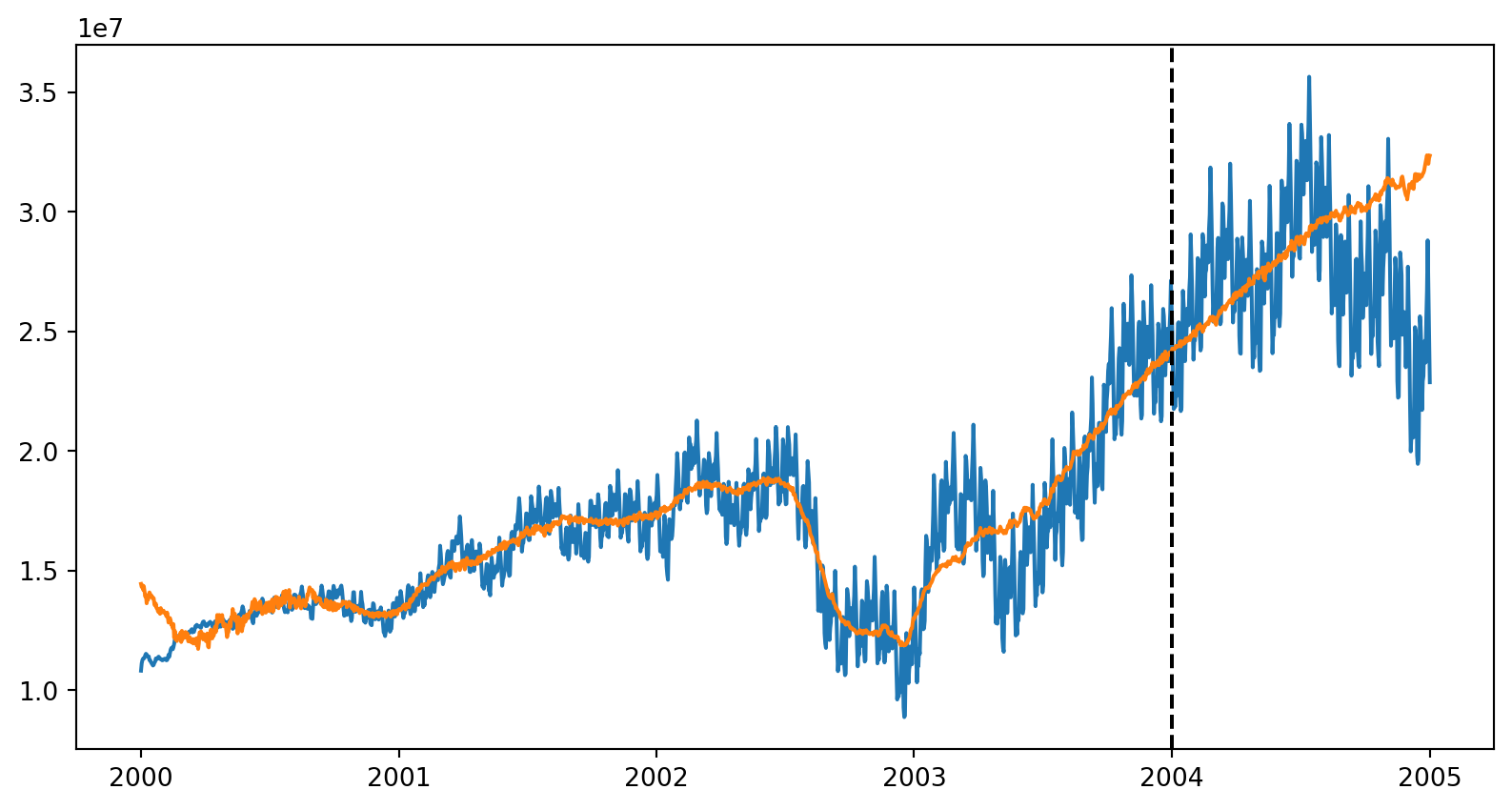
Getting the components
To obtain the contribution of each component, you can use the predict_components method:
components = model.predict_components(fh=fh, X=X)
components.head()| ad_spend | mean | obs | seasonality | trend | |
|---|---|---|---|---|---|
| 2000-01-01 | 1951346.625 | 14483135.0 | 14500406.0 | 614.705444 | 12531150.0 |
| 2000-01-02 | 1917232.500 | 14349836.0 | 14266054.0 | -50484.105469 | 12483081.0 |
| 2000-01-03 | 2016963.000 | 14425627.0 | 14459741.0 | -26353.601562 | 12435021.0 |
| 2000-01-04 | 1874734.625 | 14234283.0 | 14181140.0 | -27398.041016 | 12386946.0 |
| 2000-01-05 | 2079018.875 | 14376420.0 | 14344686.0 | -41493.996094 | 12338882.0 |
If you want to obtain all the sample to compute, for example, probabilistic intervals and measure the risk, you can use the predict_component_samples method:
samples = model.predict_component_samples(fh=fh, X=X)
samples| ad_spend | mean | obs | seasonality | trend | ||
|---|---|---|---|---|---|---|
| sample | ||||||
| 0 | 2000-01-01 | 1182749.500 | 13707321.0 | 12335327.0 | -15333.103516 | 12539905.0 |
| 2000-01-02 | 1158945.250 | 13661526.0 | 13223348.0 | -23272.130859 | 12525853.0 | |
| 2000-01-03 | 1249228.625 | 13742996.0 | 12519516.0 | -18033.396484 | 12511801.0 | |
| 2000-01-04 | 1125272.125 | 13619009.0 | 14577379.0 | -4012.927979 | 12497750.0 | |
| 2000-01-05 | 1321673.125 | 13799107.0 | 12858874.0 | -6265.105469 | 12483698.0 | |
| ... | ... | ... | ... | ... | ... | ... |
| 999 | 2004-12-28 | 5269823.000 | 31613836.0 | 30836816.0 | -16992.765625 | 26361004.0 |
| 2004-12-29 | 4986981.000 | 31321890.0 | 31899526.0 | -45524.140625 | 26380432.0 | |
| 2004-12-30 | 4852499.000 | 31175388.0 | 31748786.0 | -76963.437500 | 26399854.0 | |
| 2004-12-31 | 5050830.500 | 31449106.0 | 31127286.0 | -21041.710938 | 26419318.0 | |
| 2005-01-01 | 5125169.000 | 31548410.0 | 33430684.0 | -15503.842773 | 26438742.0 |
1828000 rows × 5 columns